Posts
Subscribe
Yours FREE -- Minute Mask Tutorial by Syndee Rogers
Published:
Fri, 01/31/20
January 31, 2020 | Digital Scrapper News | Brushability: Making Masks
Hi ,
I love to discover new-to-me super-simple techniques for Photoshop or Photoshop Elements? Don’t you?
Syndee’s
Minute Mask lesson in Brushabiltiy: Making Masks
is one of those discoveries. You’ll likely find yourself saying, “Why didn’t I think of that!!”
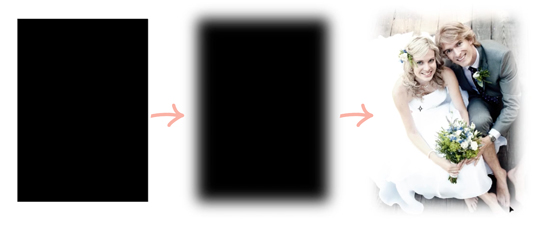
Here’s how it works:
Step One: Add a shape to your document and then simplify it.
Step Two: Apply a 75 px Gaussian Blur Filter to the shape.
Step Three: Clip a photo or paper to the blurred shape.
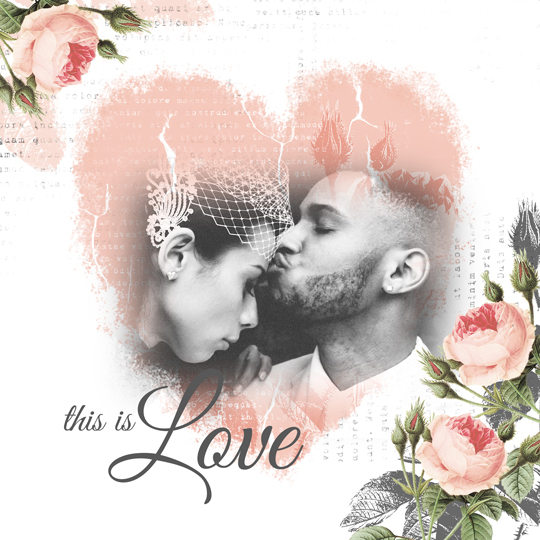
This Minute Mask technique is what Syndee used on this scrapbook page featuring a beautiful photo and the heart mask from her class.
For specific instructions, you can
watch the Minute Mask video and try this tutorial for FREE
as part of Syndee’s newest class Brushability: Making Masks. The class is
on sale NOW
thru Monday, February 3, 2020, Midnight Eastern.
Are you ready to be dazzled by masks? Check out Brushability: Making Masks below.
Love and creative success,
Jen White | Digital Scrapper & QwikLearn
DigitalScrapper.com
QwikLearn.Teachable.com
P.S. Lifetime Premier Coupon Holder? Your 2020 code applies at checkout. Look for the “Add Coupon” link.
P.P.S. Don’t let time get away from you. Brushability: Making Masks is only on sale for 3 more days.
Get the class on sale NOW.
Brushability: Making Masks - ON SALE
This class includes:
9 step-by-step Making Masks video tutorials
5 BONUS videos designed to compliment your masks
10 specialized brushes for altering your masks & images
5+ vintage elements perfect for brush design
1 class-specific organizing folder system
Beautiful Life - a full-sized scrapbooking kit
A private (optional) Facebook group
FOREVER ACCESS & a 30 day risk-free guarantee
digitalscrapper.com